
The question “how much does this customer owe?” should have a traceable answer. A balance without its underlying charges, payments and corrections creates another spreadsheet reconciliation task. For a wholesaler, the connection between delivery and the customer ledger matters as much as the invoice layout.
This article follows one synthetic customer from WholesaleOS receivables to the account history. It explains operational software behaviour, not accounting or tax treatment for a particular jurisdiction.
Start with the collection queue
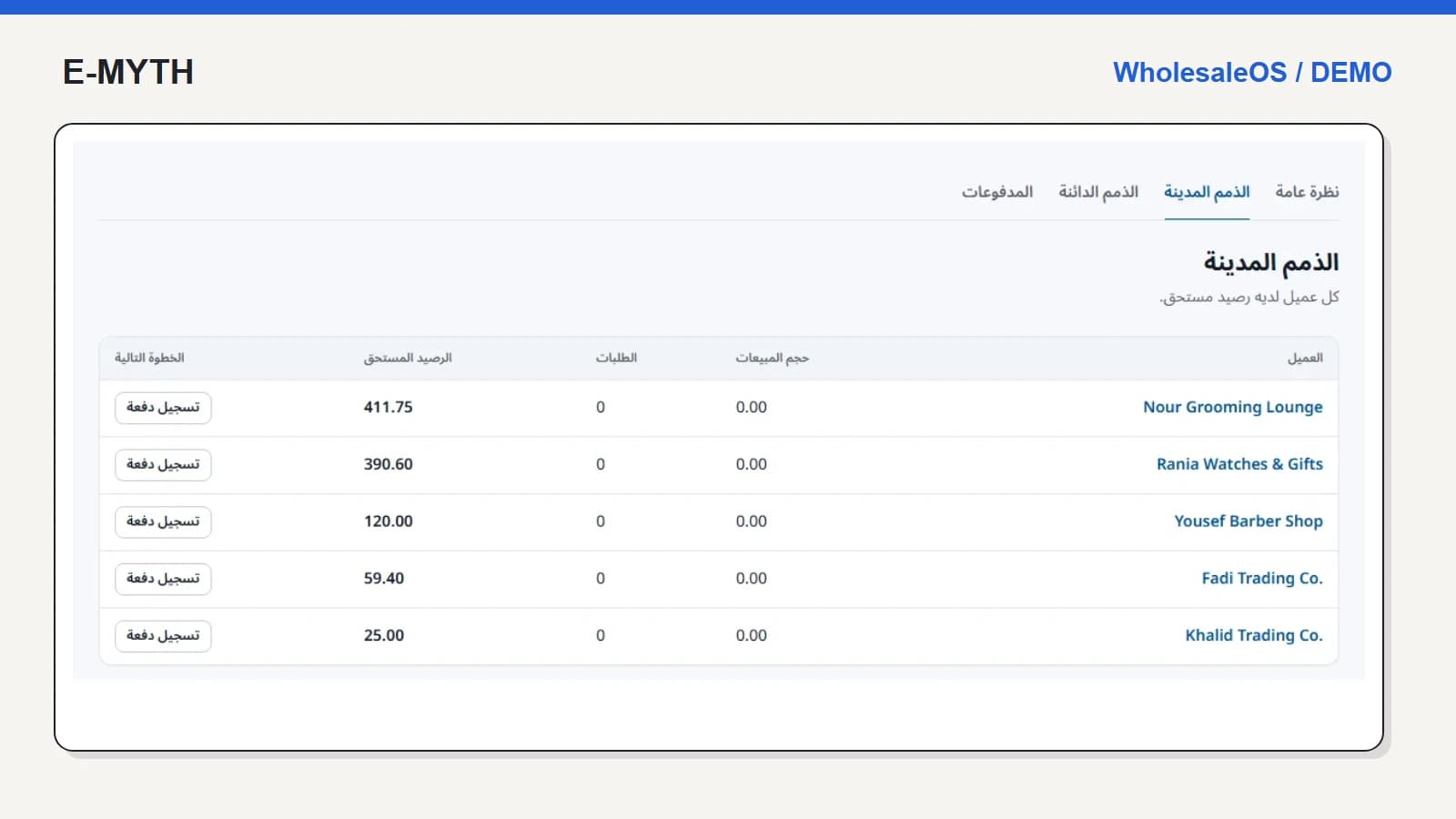
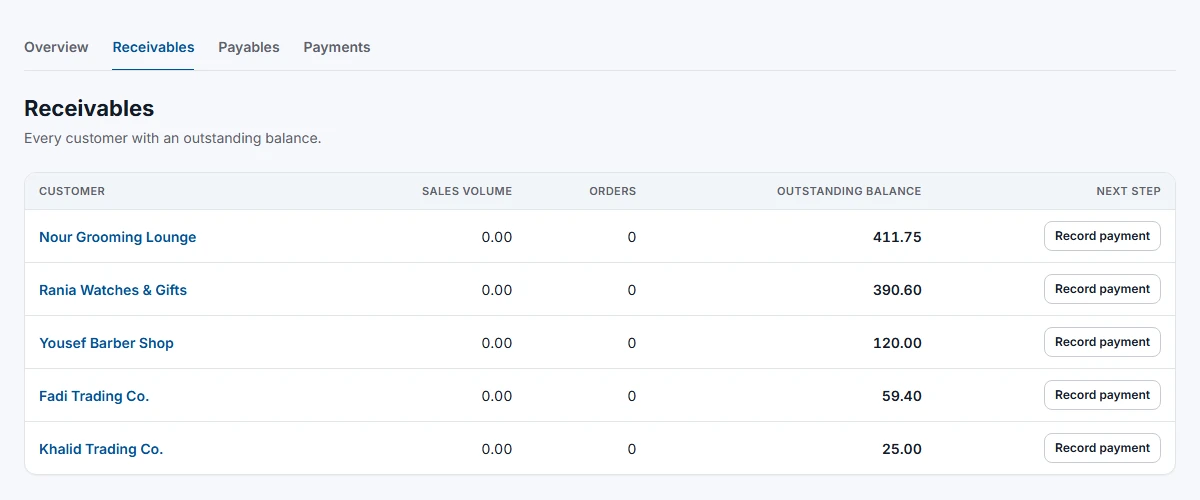
The receivables screen provides a next action for customers with a balance. In this demo, Nour Grooming Lounge has 411.75 outstanding. The sales-volume and order-count columns currently show zero, which is a reason to inspect the ledger rather than infer that no underlying charge exists.
 View the full-size screen ↗
This distinction matters when evaluating imported balances, historical transactions or differently scoped summary indicators. Ask what period and event each column uses. If staff cannot explain the difference, clarify the report definition before using it as a management target.
Open the ledger behind the amount
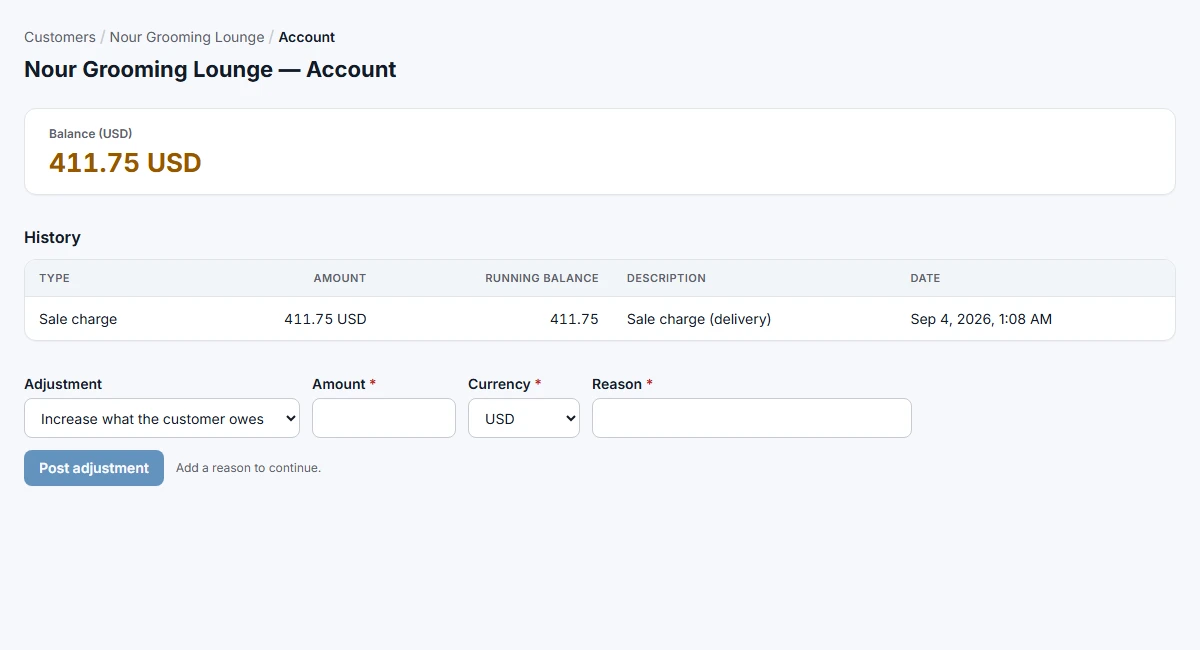
Following that customer's account link reveals a USD balance of 411.75 and a sale charge labelled as delivery. The ledger gives a transaction type, amount, running balance, description and date. The number in the queue is therefore something the team can investigate, not just copy into a message.
 View the full-size screen ↗
For the record shown, delivery created the charge. The screenshot does not show a payment being collected. This is the same distinction made in the order-to-delivery guide: stock leaving and money arriving are separate events.
Record payments with enough context to reconcile them
Agree who can record a payment, its method and reference, the customer it belongs to and how it is applied. The system includes payment records; your acceptance test should prove the effect on the relevant customer balance and the treatment of a correction.
Do not call a pending payment instruction a receipt. If the process connects to an external provider, require provider confirmation and a failure path. A locally entered payment record is not proof of a bank transfer or a live gateway settlement.
Corrections need a reason, not a silent overwrite
The account screen offers adjustments increasing or decreasing what the customer owes and requires a reason. That gives the team a deliberate correction action. Restrict who may use it and agree the documentary evidence required under your internal procedures.
A product return is another path with its own sequence. In WholesaleOS, a return being received is not yet the same as completing its credit. Follow the return and refund walkthrough rather than using an unexplained negative adjustment for every return.
Keep currencies and reporting scopes explicit
The illustrated ledger is in USD. If your business uses more than one currency, request separate balances and specify conversion policy where conversion is needed. A combined number without a currency or basis is not a meaningful collection target.
The accounts-payable side should receive the same scrutiny: purchase invoice, supplier credit and supplier payment need traceable relationships. Partial goods receipt should not automatically be treated as payment to the supplier.
Questions to answer before moving balances
- Which historical transactions must be imported, and which are represented by documented opening balances?
- Who verifies each opening balance and handles customer disputes?
- Can a collector see what they need without changing prices, stock or unrelated accounts?
- Can the team export a statement and reconcile a sample payment end to end?
Start with a handful of representative accounts, including one return and one disputed amount. Approve the reconciliation method before importing the complete customer book.
Continue with the workflow you need
- Choosing wholesale inventory software: a practical guide
- Sales and inventory: pricing, reservations and delivery
- Warehouse stock control: counts, transfers and expiry
- Purchase orders and partial receiving: a warehouse walkthrough
- Returns, refunds and warranty: separate the decisions
How this walkthrough was prepared
We reviewed the WholesaleOS implementation and opened its local demo on November 4, 2026. Screens show actual interfaces with synthetic fixtures, cropped to the relevant area without changing their content. Interface states alone do not establish customer outcomes or successful external delivery.
More perspectives