
A supplier delivering part of an order should not force your team to choose between pretending everything arrived and leaving the order entirely unreceived. Partial receiving preserves the original commitment while recording each actual arrival.
This walkthrough uses one existing WholesaleOS demo purchase order. We open its detail and receiving form without posting a new receipt. The supplier name, products and quantities are synthetic demonstration records.
Read the original commitment and the receipts together
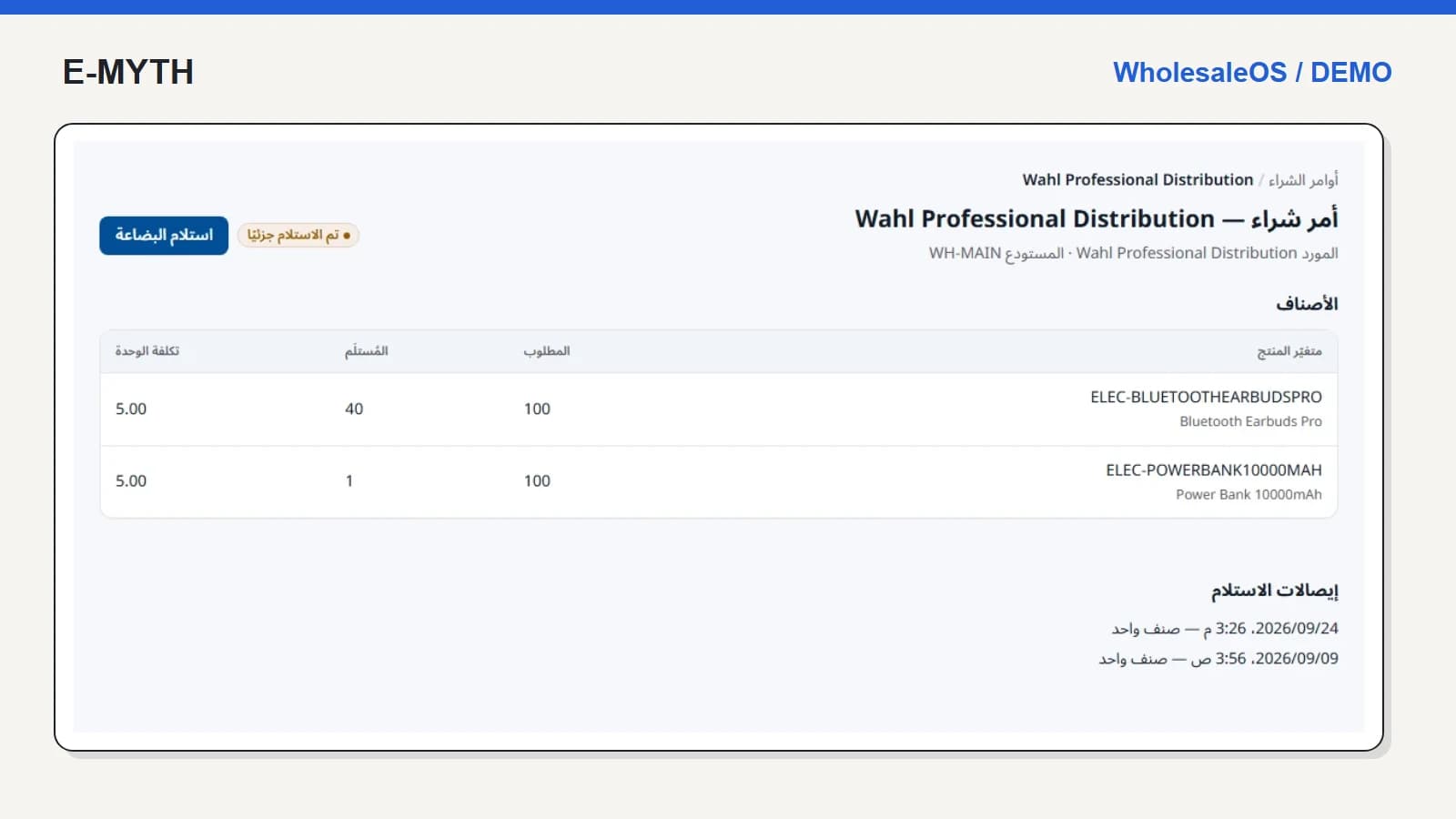
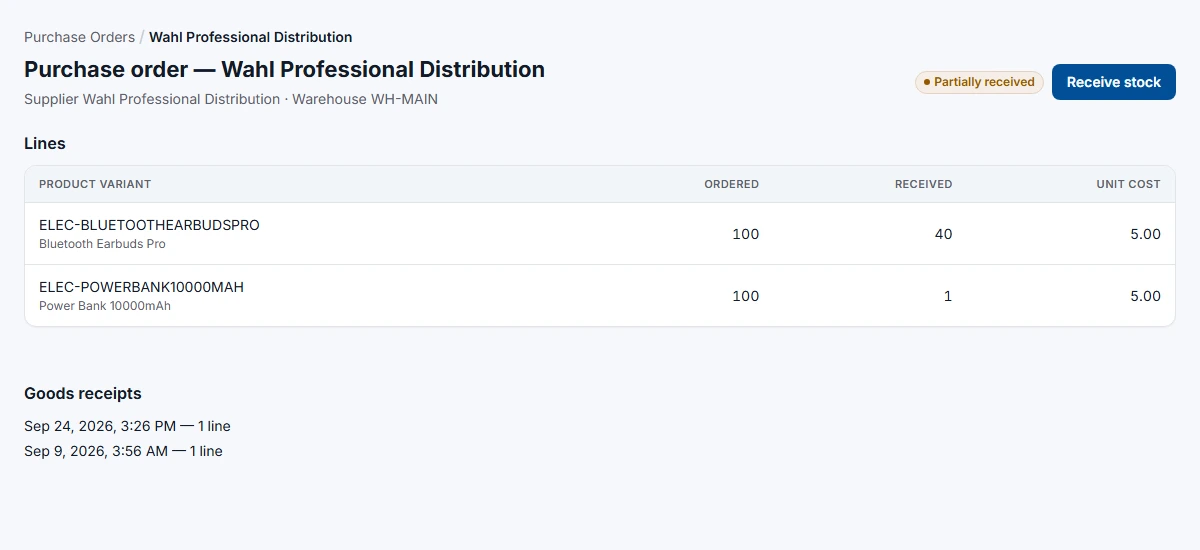
The order below contains two lines of 100 units. Forty Bluetooth earbuds have been received; one power bank has been received. The order remains partially received. The outstanding quantities are therefore 60 and 99, derived from each line independently.
 View the full-size screen ↗
This is why an order-level percentage is not enough for the receiving employee. The supplier may have completed one line, short-shipped another and substituted a third. The employee needs line-level identity and quantities, not permission to declare the entire shipment complete.
Enter what arrived now
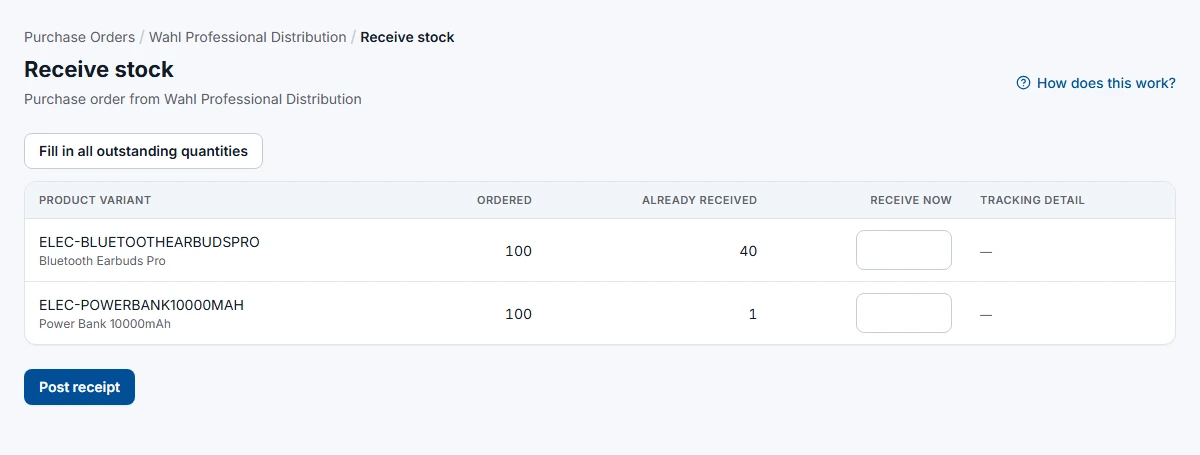
The receiving form keeps ordered, already received and receive-now quantities separate. A shortcut can fill outstanding quantities, but it should be used only after checking the physical delivery. A convenience button is not evidence that all remaining goods arrived.
 View the full-size screen ↗
If five power banks arrive, the task is to record five against the appropriate line, not replace the order quantity with five. Preserve delivery documentation and any relevant serial or batch details. Resolve unexpected products under your agreed receiving policy rather than silently repurposing another line.
Keep stock receipt separate from the supplier bill
Receiving records physical stock. A supplier invoice records the financial claim, and a supplier payment records settlement. They can happen on different dates and may be handled by different people. WholesaleOS includes supplier records, invoices, credits and payments alongside purchase orders; define how your team matches those records before migration.
Do not use an “order received” status as proof that the supplier has been paid. Likewise, an advance payment should not make goods appear in a warehouse before arrival. Include an invoice difference and a supplier credit in the acceptance exercise.
Give the warehouse only the access it needs
The implemented receiving-only permission allows an employee to reach purchase orders needed for receipt without exposing purchase unit costs and notes or granting approval rights. The first screenshot uses an owner account, which explains why cost is visible there. It is not a screenshot proving the receiving-only restriction.
Verify the restriction with a receiving account, including a direct detail URL. Ask separately who approves orders, who corrects a receipt, who records supplier invoices and who can change costs.
What happens after receiving?
Check the destination warehouse and its stock history and count controls. Then return to the purchase order and confirm that the outstanding quantity reflects the receipt. If sales was waiting for replenishment, follow the sales reservation process rather than assuming that goods arrival automatically completes every waiting order.
A practical acceptance checklist
- Create a two-line purchase order in a test environment and approve it with the intended role.
- Receive only part of one line and inspect the remaining quantity.
- Attempt an excessive receipt and an unauthorised approval.
- Confirm the stock movement and the original receipt reference.
- Reconcile the supplier invoice and payment separately.
Bring a typical supplier delivery note and an example of a short delivery to your requirements review. They reveal more about the necessary workflow than asking for a generic purchasing module.
Continue with the workflow you need
- Choosing wholesale inventory software: a practical guide
- Sales and inventory: pricing, reservations and delivery
- Warehouse stock control: counts, transfers and expiry
- Credit sales and collections: reading a customer statement
- Returns, refunds and warranty: separate the decisions
How this walkthrough was prepared
We reviewed the WholesaleOS implementation and opened its local demo on November 4, 2026. Screens show actual interfaces with synthetic fixtures, cropped to the relevant area without changing their content. Interface states alone do not establish customer outcomes or successful external delivery.
More perspectives