
“We sent the message” is not enough to close a follow-up task. The institution may still need a reply, confirmation or uploaded document. Those outcomes should be tracked separately from the provider accepting an email.
We inspect a synthetic Hayat Fund communication and the staff-delegation screen. The interface is Arabic, all recipients are fictional and provider outcomes belong to the presentation environment. No external campaign was sent for this article.
Define the response you need
Before publishing, decide whether the recipient must read, acknowledge, reply or provide documents. A general information notice and a missing-document request have different completion conditions. Put the requested action in the message itself.
The demo message asks recipients to confirm that their registered email is suitable for follow-up and explicitly asks them not to send sensitive information. The wording gives the person a bounded action rather than an open-ended request for personal documents.
Follow each recipient's state
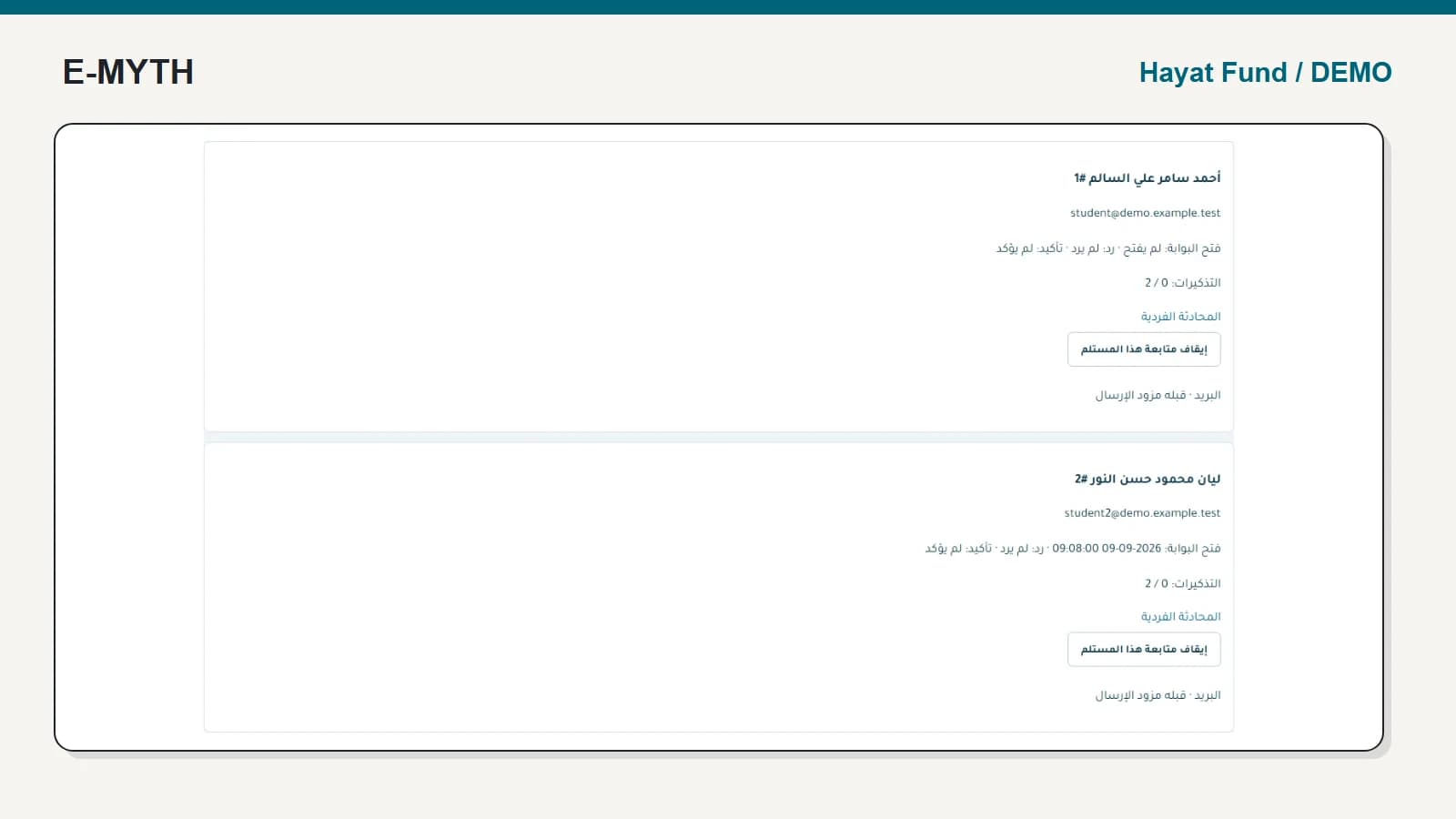
Compare the two recipient cards below. The first has not opened the portal; the second has an opening timestamp. Neither has replied or confirmed. A read timestamp therefore cannot be used to mark the requested response complete.
 View the full-size screen ↗
One recipient may open a message without responding. Another may reply and no longer need reminders. Staff should be able to find those who need intervention without reading every conversation from the beginning.
Closing the communication or stopping follow-up for a recipient is also a deliberate decision. Define who may do it and what the next employee will see. A reply should not be treated as proof that a required document has been approved.
Keep messages and case decisions connected but distinct
Use an individual conversation when a case needs clarification, but return to the application workflow for its stage and decision. Semester documents belong to the semester review process, not an unstructured attachment collection in staff inboxes.
The project separates messaging, support requests, campaigns and contact preferences. Define which channel is appropriate for each task and how consent or notification preferences apply. A contact record is not blanket permission to send every message through every available channel.
Delegate specific work rather than sharing an admin account
The delegation form offers separate grants for sending and following messages and for managing semester-document work. Read the ownership restriction above those controls before granting access to a researcher or committee member.
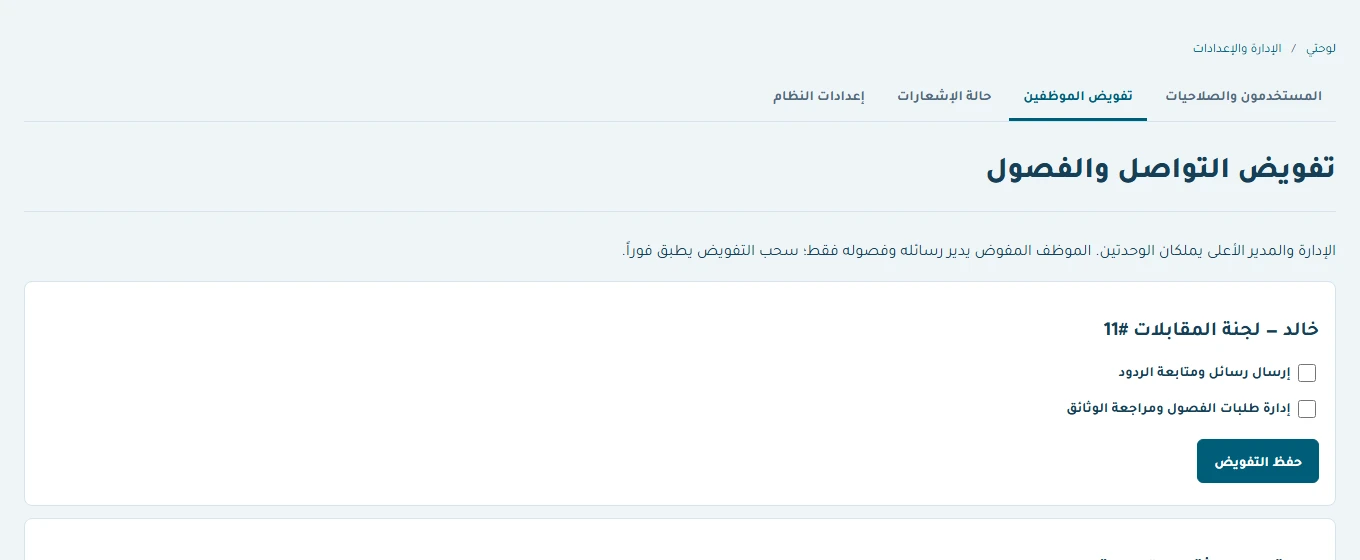 View the full-size screen ↗
An employee who follows responses does not automatically need authority to change eligibility or record disbursement. Likewise, a researcher may need a completion request without institution-wide access to donor data. Write a task-to-role matrix before granting accounts.
Test revocation and failed notification states
Use a delegated employee account to open the permitted work, then revoke the relevant permission and repeat the request. Test a direct link as well as navigation. The absence of a menu entry is not sufficient evidence of restricted access.
For notifications, distinguish queued work, provider acceptance, failed sending and any later delivery evidence. In a live setup, check actual provider responses and retries. The local presentation's simulated email or WhatsApp behaviour should not be presented as live acceptance.
A focused acceptance scenario
Publish a fictional message requiring a reply, open it as one recipient, reply as another and leave a third unanswered. Inspect filters and reminder behaviour. Then stop one follow-up and revoke one staff delegation. This scenario tests the operational purpose of communication: knowing who still needs help and who is authorised to provide it.
Continue with the workflow you need
- Scholarship management software: beyond the application form
- Support applications: reviews, missing information and decisions
- Semester support: documents, eligibility, approval and payment
- Donation management: pledges, collections and memberships
- Institutional training and reports: from registration to evidence
How this walkthrough was prepared
We reviewed the Hayat Fund implementation and opened its local demo on November 4, 2026. Screens show actual interfaces with synthetic fixtures, cropped to the relevant area without changing their content. Interface states alone do not establish customer outcomes or successful external delivery.
More perspectives